Splunk Security with the Infosec App
Security SplunkThere's so much that can be accomplished with Splunk’s security tools. Today, we are going to focus on all the benefits of the InfoSec App for Splunk.
The InfoSec app — which is an entitlement to Splunk customers — is powered by the Splunk platform, and relies on accelerated data models and the Common Information Model (CIM) to provide a consistent and normalized view into the event data that you’ll bring into Splunk. The InfoSec app has proven to help numerous organizations build their security program. It's a very popular app, having been downloaded over 21,000 times and is the perfect starter app for your organization’s security program.
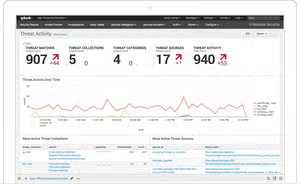
The InfoSec app is designed to address the most common security use cases of your organization. The InfoSec app contains a collection of comprehensive, extensible dashboards and alerts that focus on the most common security oriented technology components within your organization's environment. It can be used to investigate incidents, automate compliance tasks, and help protect your network, users, and intellectual property from external adversaries and malicious insider threats.

- Security Posture
- Advanced Threats
- Executive View
- Malware & Antivirus
- Firewalls
With the InfoSec App for Splunk, you'll have the ability to view all of your security events and posture in a single pane. The customizations available elevate the benefits of the app. Your organization can now complete audits by mapping customizable reports to common compliance frameworks such as NIST, HIPPA, PCI, and ISO.

The best part? The InfoSec app meets you where you are. You can configure it with Splunk Security Essentials (SSE), Splunk Enterprise Security, Splunk SOAR, and other Splunk add-ons. There is also integration between InfoSec and the Splunk Machine Learning Toolkit (MLTK) that can enable advanced ML-based correlation searches within the InfoSec app to detect threats and provide alerts.
Splunk is committed to helping customers achieve more with our security products. There is so much to be excited about with the InfoSec App for Splunk and as always, Splunk is here to help with any questions you may have. Learn more and download the app here.
Happy Splunking!
----------------------------------------------------
Thanks!
Alex Salesi
Related Articles

Stat! 3 Must-Have Data Filtering Techniques
Introducing a New Splunk Add-On for OT Security